Pages

Monday, November 14, 2011

Bandwidth Speed Test


Do you want to know the speed of your internet?  There are some websites that do bandwidth speed test such as these websites below.  One thing I like about them is they test both the download and upload speed.  Usually the other websites test only the download speed.  If your computer is connected to a network you have to make sure that the other computers are not accessing the internet except the one that you will use for testing so you can get an accurate result. 

1. www.speedtest.net
2. www.speakeasy.net
3. www.dslreports.com
4. www.bandwidth.com

By knowing the speed you can verify if you are getting the right bandwidth that you applied for from your ISP.  If the test result is close to what you applied for then there is no problem with that. However if the margin is too wide perhaps you might want to check where the problem is coming at.  Start in this sequence computer -> router -> modem -> ISP. 


Lenovo IdeaPad U460: Need an Ultra-Portable Notebook? Check This One Out!


Are you looking for an inexpensive traveling companion? These days, netbooks come a dime a dozen. Every major manufacturer offers a series of mini-notebooks. If you want to make sure that you get your money’s worth, then you might want to start with the Lenovo IdeaPad U460.
It has an etched aluminum cover and a Chiclet-style keyboard with 6-rows. The keyboard has Fn keys, a power plan button, recovery button, and a mute button. The touch pad has two buttons with scroll and multi-touch features. This netbook is available in Midnight Plum or black. The cover is made with aluminum.
The Lenovo IdeaPad U460 is made with the following specs:
· Processor: i3-30M
· Processor speed: 2.53 GHz
· Memory: 4 GB standard – 8 GB max
· Display: 14-inch HD widescreen with LED backlight
· Battery: Lithium Ion 8-cell (6 hours)
· Hard drive: 500 GB ·Graphics: Integrated Intel HD
The Ambient Light Sensor will adjust the display to suit your lighting conditions. This way, you can stay online all day and night without having to adjust the lighting settings manually. This means less eye strain for better viewing. You can view everything outside as well without any sun glare.
Since the U460 is ideal as a traveling companion, you will probably want to transfer files between it and your home PC. The DirectShare synchronization feature will allow you to do just that. You can transfer files back and forth at impressive speeds.
You can listen to music with the Dolby Advanced Audio system. The audio that comes out of the stereo speakers is amazing. Who needs an mp3 player when you can listen to music on this netbook while you travel?
If you’re concerned about data backup and recovery, you’ll find the Lenovo Rescue System to be a great feature. It allows you to recover data or run an Antivirus program with just a click of a button.
The Lenovo IdeaPad U460 comes with a number of ports and connections: a 5-in-1 reader, 3 USB 2.0, an eSATA port, PCIe Mini Card slots, gigabit Ethernet, microphone in put, Bluetooth 2.1, and HDMI.
This laptop comes with some great preloaded applications, such as Windows Live Essential and McAfee VirusScan Plus. There is a fingerprint reader for security. There’s no need to remember passwords. All you have to do is swipe your finger in order for you to access the notebook.
In order to get the best deal, you can use Lenovo IdeaPad U460 coupon codes. Just enter them into the order form when you check out. You might be able to use more than one to save even more money! Before using a coupon code, read the rules so that you’ll know if you can use all of them together.
Learn more about Lenovo IdeaPad U460 coupon offers. It’s already pretty affordable, at less than $700, but you can save even more with Lenovo discounts. This is a really popular laptop with tons of positive reviews. It offers everything you could need in a mid-price range notebook.

This article is a guest post by Nadav Snir from GripBuy.com.
Sunday, November 13, 2011

Remote Shutdown


One of the annoying practices of some employees is negligence of not shutting down their computer when they are leaving the office especially on weekend or just before holiday. If you are the one in charge of the network administration you might have encountered this once in a while. If you are “certain” that an employee has left the office already and he/she did not turn off the computer, did you know that you can remotely shut it down? You need to have an administrator priviledge so you can perform this task. I just want to warn you not to do this unless necessary because there is no way to recover unsaved documents and if windows happen to be updating at that moment might just create more trouble on the computer.

1.Click Start or Windows Logo
2.Click Run and type cmd
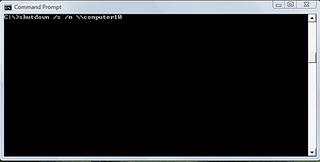
3.On the command prompt type shutdown /s /m \\[the name of computer] you can also use /f to force any open application to close without warning
e.g. shutdown /s /f /m \\computer10

Email Tracer


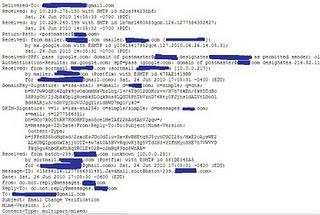
Would you like to know the origin of the email you received?  Before you do that you have to copy first the email header of the email you want to trace.  The picture above is a sample of an email header, there are some information that are covered for privacy reason.  For the following email you may follow the instructions on how to get the email header.

Yahoo
1. Open an email
2. At the lower right of the screen, click Full Headers
3. Highlight the email header
4. Press Ctrl + C

Gmail
1. Open an email
2. Click Show Original
3. Highlight the email header
4. Press Ctrl + C


Once you are done with the copying of email header open this website http://www.ip-adress.com/trace_email/  and under  the “For email tracing copy and paste an email header in this field:” paste the email header.  Click Trace Email Sender button.

From now on you will be able to know where an email originated. Enjoy tracing....

Telnet


Did you know that there is another way of checking the email with the use of DOS command?  This procedure will work only on Windows, Mac and Linux has also their own way.

Here's how to do it:

1. Click Start
2. Click Run
3. Type cmd
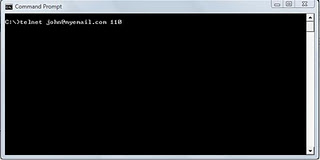
4. At the command prompt, type telnet myemailprovider.com 110 (where myemailprovider is your email provider)
5. Type USER yourusername (you will see what you type or not, and "yourusername" is your email account which comes just before the @ e.g. john@myemail.com)
6. Then type PASS your password (don't be surprised that you see your password as you type)
7. You will see a list of items with labels like "1 600" and "2 1122".
8. If you'd like to look at the message labeld 2 1122, type retr 2. Just type the email that you want to see by typing its number as you can see on my example which is 2.
9. If you want to delete message 1 600, type dele 1.
10. When you are done checking your email, simply type quit.

This procedure may be use to checking purposes and not to actually replace the way we check out email. 


Design by Free WordPress Themes | Bloggerized by Lasantha - Premium Blogger Themes | Lady Gaga, Salman Khan